




What is Microsoft Azure CDN?
In this article we will explore what is Microsoft Azure CDN, its features and when to use it.
- Pre-requisite Knowledge –
Before we start with the understanding of what is Microsoft Azure content delivery network (CDN), we should know –
- Basic knowledge of cloud computing and its services
- Basic knowledge of Microsoft Azure
- Basic knowledge of Web Application Development.
- Background –
In this article, we will explore what is Microsoft Azure CDN, its features and when to use it.
Before we look into it, let’s understand ‘what is CDN?’ -
- In the internet-facing Web application, we face multiple challenges related to latency issues.
- We need to be more focused on such implementation to minimize the latency to render the content on site.
- There are multiple ways around it. One way is to utilize the ‘Content Delivery Network – CDN’.
- CDN is a distributed network of servers that can efficiently deliver web content to users.
- CDN stores the cached content on servers in point of presence location (POP) which is closer to the user.
- Introduction of Microsoft Azure CDN –
- Microsoft Azure CDN works on the same model as explained above.
- Azure CDN rapidly delivers the content by caching it physical nodes across the world.
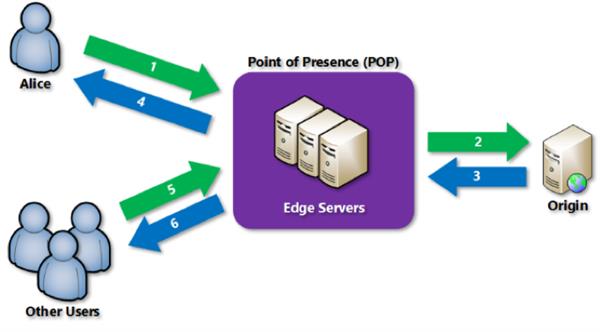
Image Source – Microsoft Docs
- Azure can also serve the dynamic content too like shopping cart, search results which are not cached by using dynamic site acceleration (DSA)
- To start to utilize these features, you must have at least one Azure subscription and CDN profile.
- CDN profile is a collection of endpoints that has configurations of content delivery and access.
- Please note that Azure pricing is based on the CDN profile.
- It is best for –
- Application having multiple rounds of trips to the servers
- Serves the content from the edge server which minimizes the load on origin server with less traffic.
- Delivering static content such as images, videos, style sheets, client-side scripts, and HTML pages to reduce latency
- Features -
- We can configure custom HTTPS domains on Azure CDN for robust security.
- Azure diagnostics logs allow you to export basic usage metrics from your CDN endpoint.
- It has integration with other Azure resources like web apps, media storages, blob, event hubs, log monitoring, etc.
- We can enable the compression of files in Azure CDN to improve the performance.
- It has a massive capacity with its global presence to handle heavy loads and sudden traffic rise.
- Azure CDN integrates with services from Akamai and Verizon, enabling customers to select the right solution for their needs.
- Azure CDN has API’s to consume it and do further analytics.
- Azure prices – pay as you use, no upfront and termination fees.
- Reference Links –
- https://docs.microsoft.com/en-us/azure/cdn/
- https://azure.microsoft.com/en-in/services/cdn/
- https://docs.microsoft.com/en-us/azure/cdn/cdn-overview
- https://docs.microsoft.com/en-us/azure/cdn/cdn-custom-ssl?tabs=option-1-default-enable-https-with-a-cdn-managed-certificate
- https://docs.microsoft.com/en-us/azure/cdn/cdn-azure-diagnostic-logs
- https://docs.microsoft.com/en-us/azure/cdn/cdn-improve-performance
- https://azure.microsoft.com/en-us/pricing/details/cdn/
Conclusion - In this article, we have learned the overview of Microsoft Azure CDN, its services and when to use it.