

How do I deploy a Blazor application in IIS?
Jun 07, 2021
Blazor,
ASP .NET Core Blazor,
Blazor FAQ,
deploy blazor application,
IIS deployment balzor,
980 Views
This code will help you to understand how to deploy a Blazor application in IIS.
The Blazor application can be deployed to IIS using Visual Studio or you can also configure manually. Find the steps to deploy the Blazor application.
Deploy an app from Visual Studio to IIS
- Install the .NET Core Runtime Hosting Bundle in your device.
- Create a Blazor application
- Publish the application using context menu from the Solution Explorer in Visual Studio
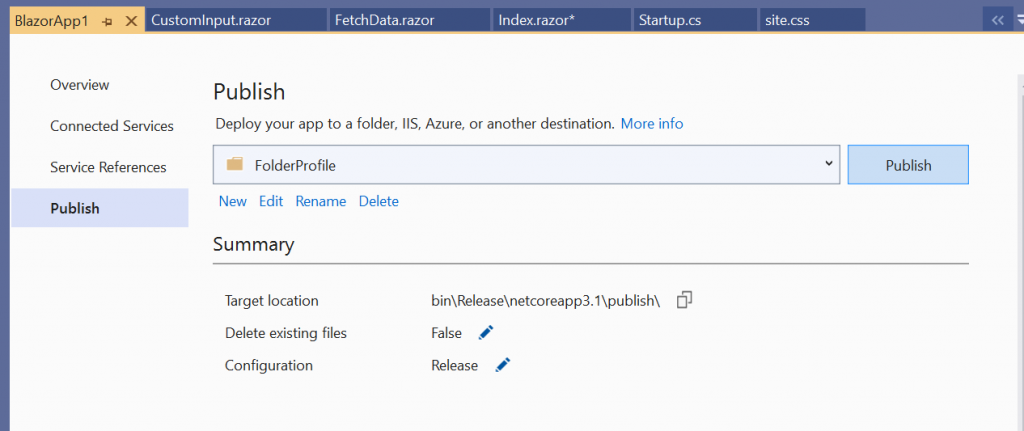
- Click Publish. If there is no error, your application will be published successfully.
Manual Deployment to IIS
You can publish the Blazor application using “dotnet publish” command. Please refer to the document dotnet publish for additional commands.
IIS config
- Open the IIS.
- Right click the defaultApp site and create a new website.
- Insert the site name and physical path (published folder path).
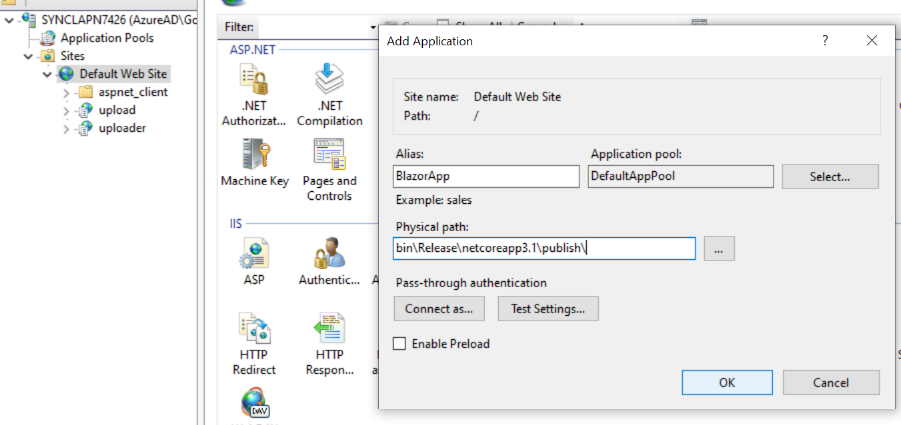
- Click Ok .
- Now, config the site in ApplicationPool, and you can browse the site.